How to Subscribe to Your Team’s Champions League Calendar
Add your team’s Champions League fixtures to Apple or Google Calendar, or download a one-time .ics file. See what happens when a kickoff moves.
Choose your teamFind your team’s calendar
- In the Champions League schedule, open Filter by team and select a club. You can follow along with Arsenal selected.

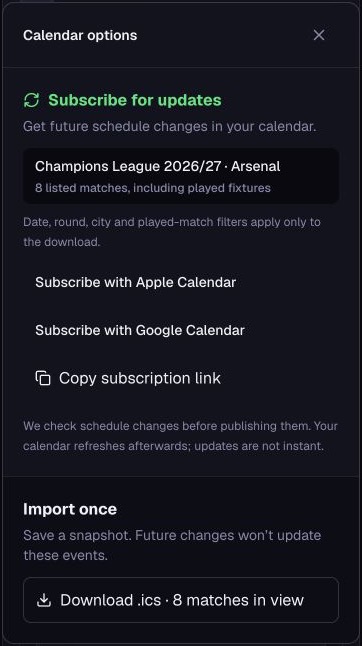
- In the club overview, choose Add Arsenal fixtures (the button shows your selected club). This menu covers all of the club’s listed fixtures, including any already played.
Choose how to add the fixtures
Subscribe for updates
Choose Apple Calendar or Google Calendar and confirm in your calendar app. You can also copy the subscription link.
In Google Calendar on a computer, use Other calendars → From URL, paste the link, and choose Add calendar.
Import once
Choose Download .ics and import the file into your calendar. To download just the fixtures shown after filtering by round or date, use Add matches in view before downloading.
What happens if kickoff moves?
We manually verify and publish schedule changes. Your subscribed calendar can pick up the new kickoff time the next time your calendar provider checks the feed. The timing depends on your calendar provider.
A one-time import keeps the time from the downloaded file. If kickoff moves, edit that event in your calendar or replace it using a fresh download.